   ██████╗ ██╗██╗      ██████╗ ████████╗
   ██╔══██╗██║██║     ██╔═══██╗╚══██╔══╝
   ██████╔╝██║██║     ██║   ██║   ██║
   ██╔═══╝ ██║██║     ██║   ██║   ██║
   ██║     ██║███████╗╚██████╔╝   ██║
   ╚═╝     ╚═╝╚══════╝ ╚═════╝    ╚═╝
AI that ships your tickets while you focus on architecture.
Pilot is an autonomous development pipeline with 260+ features production-ready. It picks up tickets from GitHub Issues, GitLab Issues, Linear, Jira, Asana, Plane, or Discord — plans the implementation using your codebase context, writes code with Claude Code, runs quality gates, and opens a pull request. You review and merge.
┌──────────────┐     ┌──────────────┐     ┌──────────────┐     ┌──────────────┐
│    Ticket    │     │    Pilot     │     │ Review (opt) │     │     Ship     │
│ (GitHub/GL)  │ ──▶ │  (executes)  │ ──▶ │    (You)     │ ──▶ │   (Merge)    │
└──────────────┘     └──────────────┘     └──────────────┘     └──────────────┘
No prompting. No babysitting. Label a ticket, get a PR or a release.
Quick Start
# Install
curl -fsSL https://raw.githubusercontent.com/qf-studio/pilot/main/install.sh | bash

# Configure
pilot setup

# Set your Git token (GitHub or GitLab)
export GITHUB_TOKEN="your-token"   # or GITLAB_TOKEN

# Start Pilot
pilot start --github --dashboard   # or --gitlab
Then label any issue with pilot. Pilot picks it up within 30 seconds.
Works with your Claude subscription (Pro/Max) or Anthropic API key. No separate API key required if you’re already logged into Claude Code.
What Makes Pilot Different
Ticket-driven, not prompt-driven
Other AI tools need you in the loop — typing prompts, reviewing suggestions, copy-pasting code. Pilot works from your existing ticket system. Write the ticket like you would for a junior developer. Pilot handles the rest.
Context intelligence
Pilot’s built-in context engine reduces token usage by 92% while following your architecture, patterns, and conventions. Strategic documentation loading gives Pilot deep codebase understanding — not generic code generation. Read the Navigator docs →
Autopilot CI loop
Pilot doesn’t stop at creating a PR. In autopilot mode, it monitors CI, auto-merges when tests pass, and automatically creates fix issues when CI fails — targeting the original branch for fast iteration. Three modes: dev (fast), stage (CI required), prod (human approval required).
Self-hosted, self-updating
Single Go binary. Runs on your infrastructure. Your secrets never leave your environment. Hot-upgrades itself without downtime — press u in the dashboard and the binary replaces itself in-place.
Core Features
| Feature | Description |
|---|---|
| Multi-Platform | GitHub, GitLab, Linear, Jira, Asana, Azure DevOps, Plane, Discord |
| Autopilot | CI monitoring, auto-merge, failure feedback loop |
| Telegram Bot | Chat, research, plan, and execute tasks from mobile |
| Conversational Bot | Fast chat, grounded code Q&A, and talk-to-ticket issue intake (docs) |
| Quality Gates | Test, lint, and build gates with automatic retry |
| Self-Review | Code review runs before PR push |
| Epic Decomposition | Complex tickets automatically split into subtasks (Epic Decomposition docs) |
| Claude Code Hooks | Inline quality gates — stop gates, destructive command blocking |
| Multi-repo polling | Manage multiple repositories from a single instance |
| Session Resume | 40% token savings on self-review via context continuation |
| Model Routing | Trivial tasks use fast models, complex tasks use deep reasoning |
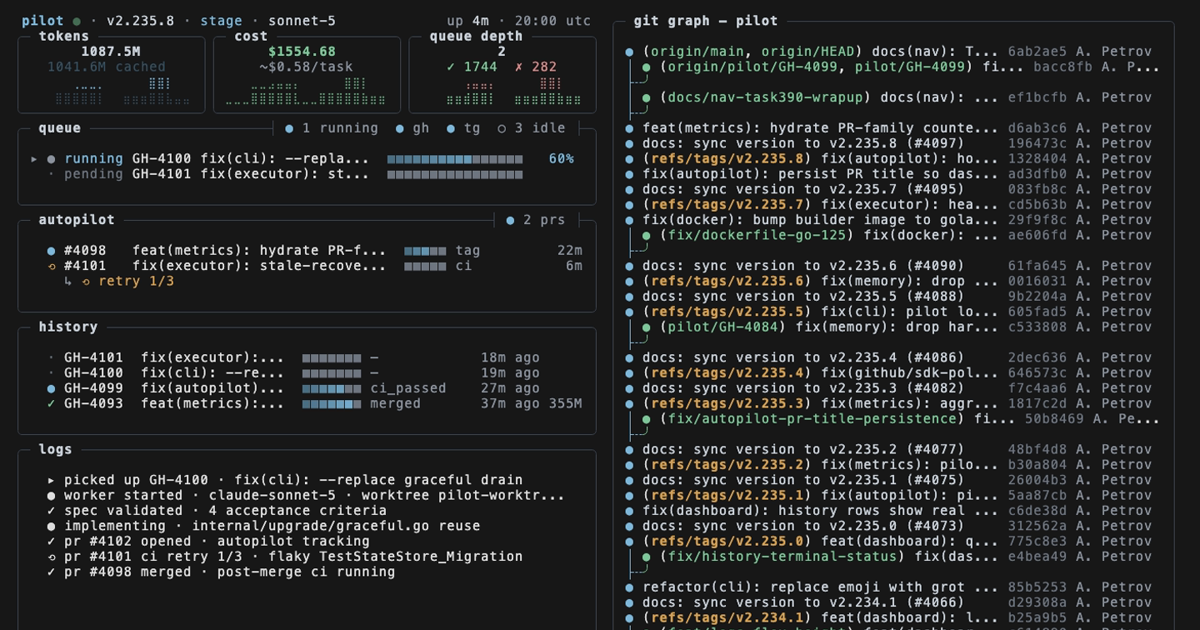
| Dashboard | Terminal UI with token usage, costs, and task history |
| Hot Upgrade | Self-update without downtime, in-process binary replacement |
| Notifications | Slack, Telegram, email, webhooks, PagerDuty |
Who It’s For
Solo developers — Handle your backlog of boring tickets while you build features. Wake up to PRs ready for review.
Team leads — Turn 47 tickets into 47 PRs. Review them like any team member’s code. No new tool to learn — your team just labels issues.
Organizations — Codify engineering standards with context intelligence. Every PR follows your patterns, across every team. Self-hosted for security. PR review for control.
Ideal Tasks
Pilot works best on well-defined, bounded work:
- CRUD endpoints and React components
- Test coverage for existing code
- Documentation and README updates
- Bug fixes with clear reproduction steps
- Dependency updates and security patches
- Database migrations with straightforward schema changes
Not for: architecture decisions, novel algorithms, or anything requiring engineering judgment. Pilot augments your team — it doesn’t replace it.
Open Development
Pilot is source-available under BSL 1.1 . Free for internal use and self-hosting. Inspect the code, audit what it does, contribute improvements.